
Friday, October 14, 2016
Ad Extensions
Ad extensions can be extremely helpful to increase the number of clicks to your ads as well as raise the CTR. This occurs because it is a way of getting peoples' attention. The way you can set up an ad extension is by going into Google Adwords and clicking the Ad Extensions tab. After getting to the Ad Extensions tab, you can click the selection drop down menu, and choose either Sitelinks Extensions or Callout Extensions.
 To add a sitelink or callout, click the + Extension button. Then you can select a campaign or ad to add it to. The reason for sitelinks is because it can help you highlight sections of your site which you want to target and have viewers look at. On the other hand, callouts are useful to increase CTR and add extra text beneath the ad. Often it is set as value propositions, like "free shipping". What I recommend doing is to try both extensions out to see how it can boost your CTR and increase your overall campaign.

Wednesday, October 12, 2016
eCommerce Analytics - Gumroad
Analytics helps you to make an advertising campaign more effective, and more efficient, and this is extremely valuable for your business. It helps your business also to generate more revenue and use existing budget more wisely. An example site that has a built-in analytics feature is Gumroad, https://gumroad.com/. This site will tell you how many people visited the site, and how many people went on to actually purchase an item.This is a great starting point if you are just beginning with learning the basics of analytics.
 Gumroad is mainly a site where individuals come and sell digital downloads. The more downloads someone sells the better the conversion rate will be. You are able to calculate this rate by taking the number of sales you make and dividing it by the number of visitors you get. My suggestion is to just try making an account and testing it out for yourself. Once you become more comfortable with working in Gumroad and Google Analytics than you can move on to trying to make "goals" in Google Analytics. Overall, you have to be willing to try new things in order to become better at them and Google Analytics is no exception.
 Gumroad is mainly a site where individuals come and sell digital downloads. The more downloads someone sells the better the conversion rate will be. You are able to calculate this rate by taking the number of sales you make and dividing it by the number of visitors you get. My suggestion is to just try making an account and testing it out for yourself. Once you become more comfortable with working in Gumroad and Google Analytics than you can move on to trying to make "goals" in Google Analytics. Overall, you have to be willing to try new things in order to become better at them and Google Analytics is no exception.
 Sunday, October 9, 2016
Campaign Strategies
When working with Google Adwords the help button may come in handy if you have any questions that need to be addressed. Some campaign strategies that are helpful to take a look at when creating an ad or campaign is the suggestion feature, where Google scans campaigns and offers ideas you may want to try. However, your campaign may need to run for a little bit before Google will suggest things, that is why it is extremely important to check your campaign on a regular basis. One suggestion Google may come up with is certain keywords that you can use to increase traffic to your site.
If the keywords that are suggested by Google apply to your ads than you can click Apply. If for some reason the list of keywords do not apply to your ads you are free to uncheck the boxes and those suggestions will no longer be viewed. Therefore, if you accept the suggestion, Google automatically adds the keywords for you and you do not have to do anything else. Overall, Google wants to help increase traffic to your site by helping improve your ads and the keywords people often search, to ultimately help find your product or service. The chart below gives an example of suggested keywords Google gave.

If the keywords that are suggested by Google apply to your ads than you can click Apply. If for some reason the list of keywords do not apply to your ads you are free to uncheck the boxes and those suggestions will no longer be viewed. Therefore, if you accept the suggestion, Google automatically adds the keywords for you and you do not have to do anything else. Overall, Google wants to help increase traffic to your site by helping improve your ads and the keywords people often search, to ultimately help find your product or service. The chart below gives an example of suggested keywords Google gave.

Analytics Report
This week in class we were reporting analytics data for different websites. The website I had was for National Tiger Sanctuary. I set the date range to be from 10/03-10/09/16 and from there I examined the analytics data. I started off by going to acquisition and then looking at the overview report for the National Tiger Sanctuary site. The below graph displays how many people visit the site and where they came from. As shown, 97% of the visitors came to the site because of a referral. Referral Traffic means that a user clicked on a link from another website that linked back to the National Tiger Sanctuary website. This data is good to know because it shows how people are hearing about the website and actually going to it.

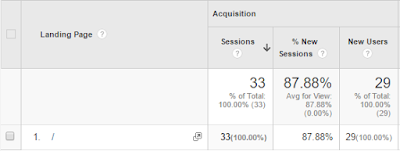

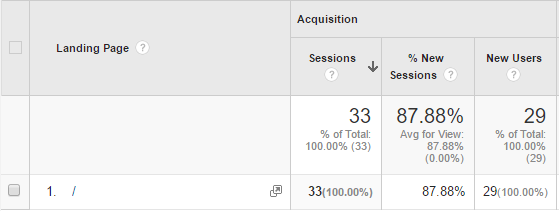
Another important display to look at is the landing page to know how visitors are entering your site because it is a key component to be successful. Presented below shows the data from the landing page, of those who visited the site during this date range, 29 of the users were new. The only landing page that was presented was the home page, therefore, those users were taken to the home page of the National Tiger Sanctuary site, which was interesting to see.
Thursday, October 6, 2016
Callout Extensions

This week for class we learned how to create callout extensions for our campaign. Callout extensions are useful because you get an extra line of text to communicate your value. It can also increase your click through rate which can ultimately boost your quality score and lower your costs. The benefits it brings to your ad is that you can mention different components and benefits that your company, product or service has over others. As well as, you can tailor callouts for optimal performance on mobile, desktop or tablet devices. In the graphs displayed below it shows what callout extensions I used for my campaign and how I can tailor each one to either specific ads or my overall campaign.


Sunday, October 2, 2016
Keywords
When creating ads it is important that you make sure your keywords are ones that relate closely with what you are trying to advertise for or in some cases what consumers may be interested in. Whatever the topic or advertisement you are trying to promote take some time and think of words or phrases that one may search for that closely resembles that ad. By doing this step it can help in the long run with getting more traffic on your website or advertisement because keywords help consumers click on what they are looking for.
A great tool to try in Google Adwords is the Keyword Planner. This planner helps with finding new keywords and get search volume data. To find new keywords you can click on "Search for new Keywords using a phrase, website or category" and review the options. After trying out different words or phrases you can pick which ones you want to use for your ads. Search volume is another interesting thing that you can look at as well. This tool helps you to see who is actually searching for the keyword or phrases you are using. You can go to the Keyword Planner and click on "Get search volume data and trends". All you really have to do is type in keywords and see how many people actually search those words, this can be valuable information because it gives you an idea of how to set your bidding with the keywords you use, what your budget might be, and gives you a general idea of what the break even might be for the products you might be selling.

A great tool to try in Google Adwords is the Keyword Planner. This planner helps with finding new keywords and get search volume data. To find new keywords you can click on "Search for new Keywords using a phrase, website or category" and review the options. After trying out different words or phrases you can pick which ones you want to use for your ads. Search volume is another interesting thing that you can look at as well. This tool helps you to see who is actually searching for the keyword or phrases you are using. You can go to the Keyword Planner and click on "Get search volume data and trends". All you really have to do is type in keywords and see how many people actually search those words, this can be valuable information because it gives you an idea of how to set your bidding with the keywords you use, what your budget might be, and gives you a general idea of what the break even might be for the products you might be selling.

eCommerce Analytics
Tracking ROI is an extremely important skill to have for anyone who wants to make money. The best way to track ROI is by being able to do "real" conversation tracking, which means you can tell exactly how effective a particular ad has been, in terms of making money. Google Adwords with the help of analytics can tell you exactly how much money you are spending. Based off this information I highly recommend trying it out for yourself.

An eCommerce site that you can set up all on your own, is called shopify, and you can learn how to track ROI by going to the site: https://www.shopify.com/. To get started, go to the site and click the get started button. From there you have to enter some information about yourself, such as your email address, a password, a store name, and then you will have to fill out your name and address information. The next step you would have to choose between selling physical products online or digital products, I would recommend for your first time keeping it simple and selling digital products. After you decide what you are going to sell you can customize the look of your store to appeal to consumers. You will eventually proceed to the putting in your billing information and setting a price for your products. Once everything is set up you are able to start making money and tracking ROI.
Subscribe to:
Posts (Atom)